Stage plot template
Rock Band Stage Plot Template
Open an editable four-piece sample: lead vocal, bass, one guitar, and drums. The PDF includes seven example inputs and four mono wedge requests. Adjust to your setup and confirm the requests with your venue before sharing.
Build a rock band stage plotExample PDF
Example PDF from this template
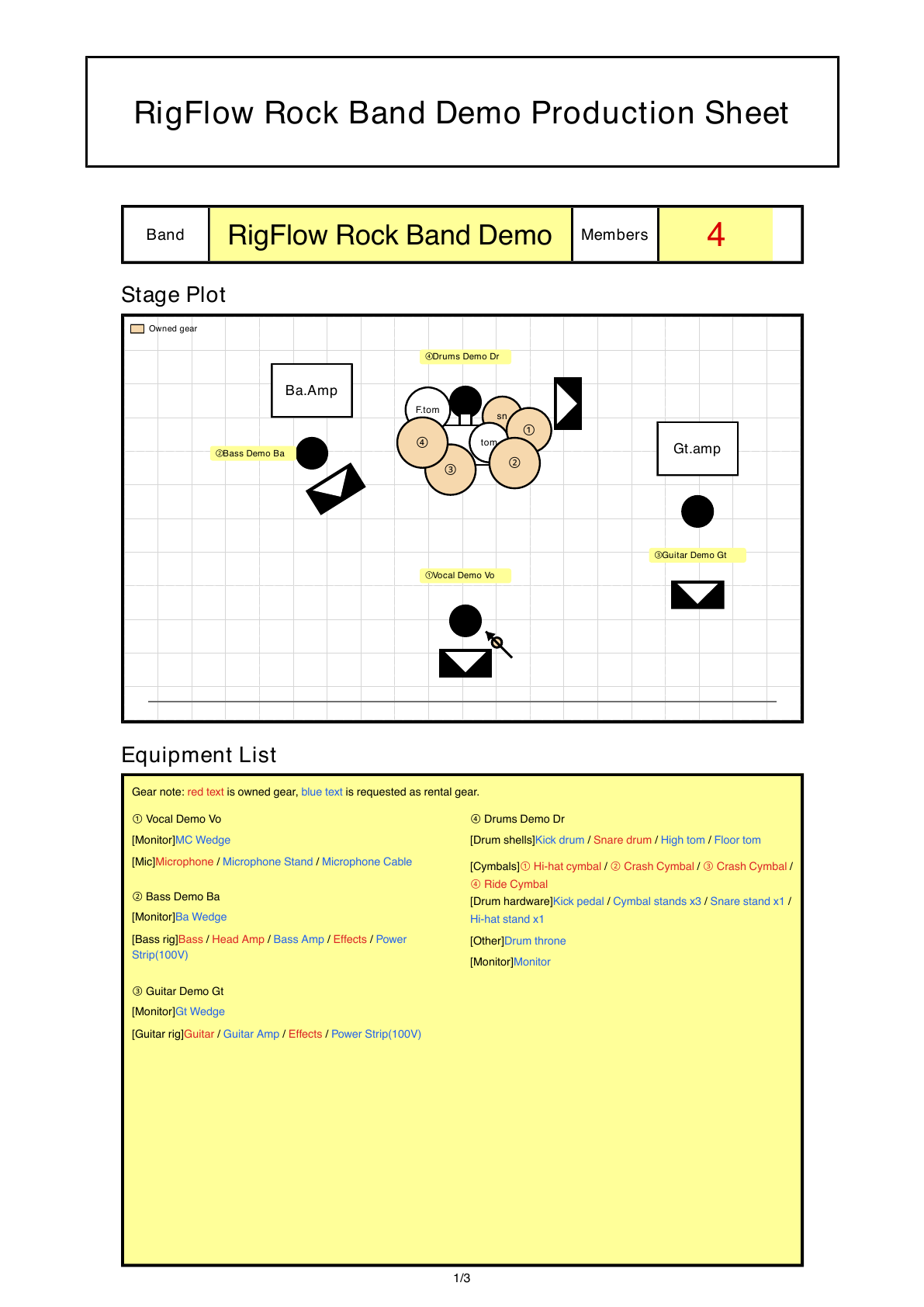
Actual RigFlow PDF export generated from this rock band stage plot template, including the stage plot and production details a venue can review before load-in.
Best fit for this template
A four-piece sample for lead vocal, bass, one guitar, and drums, with seven example inputs and four mono wedge requests.
The venue should be able to see where the backline sits, which guitar amp needs a microphone, which vocals need channels, and which wedges matter before load-in.
Venue questions this template answers
- Can the venue provide the requested guitar amp microphone and bass DI?
- Does the drummer need vocal, bass, click, or playback in the monitor?
- Which requested items can the venue supply, and which will the artists bring?
Layout priorities
- Keep the drummer and drum inputs visually separate from guitar and vocal positions.
- Show each amplifier from the front-of-house perspective so stage left and audience left are not confused.
- Place the lead vocal downstage center only if that is where the venue should prepare the main wedge.
Example stage layout
- Place drums upstage center, bass amp upstage left, one guitar amp on the other side, and the lead vocal downstage center.
- The sample uses a bass DI with the bass amp for stage sound, one guitar amp microphone, and four mono wedges. Venue supply is an example request, not confirmed availability.
Suggested input list
- Kick
- Snare Top
- Overhead L
- Overhead R
- Bass DI
- Guitar amp mic
- Lead vocal
Equipment notes
- Mark each amplifier location and whether the cabinet needs a microphone.
- Add DI needs for bass if the amp is only for stage monitoring.
- Keep drum, guitar, and vocal labels consistent with the input list.
Monitor notes
- Lead vocal usually needs the clearest vocal mix in the downstage center wedge.
- Drummer may need vocals, bass, and one guitar cue if there is no in-ear system.
- The guitar wedge in this sample is one mono return; add the mix contents you actually need.
Common missing details
- Adding backing vocals without adding their microphones to the input list.
- Not saying whether guitar amps should be mic'd, DI'd, or kept as stage volume only.
- Forgetting to mark who needs the loudest vocal, click, or guitar in each monitor.
PDF review checklist
- The sample has one lead vocal microphone. Add channels if your lineup also sings backing vocals.
- Every amp label says whether it is mic, DI, or stage-volume only.
- The input list still matches the stage plot after any lineup change.